For organizations

How BidMosaic works for charities.

A walkthrough of every decision involved in setting up a campaign — from choosing the model and price to connecting Stripe, verifying your nonprofit status, and going live. Read it end to end if you are evaluating BidMosaic for the first time, or jump to a specific section.

The big picture

What you are building.

A BidMosaic campaign is a single shared canvas your supporters fund pixel by pixel. You set the cause and the rules; supporters build the artwork together as they contribute. The canvas can start blank or be seeded with a background image you supply — the choice depends on the mosaic type you pick.

You are not bolting a fundraising widget onto a campaign. The mosaic is the campaign. You set the canvas size, the per-pixel price, the contribution rules, the timeline, and the payout account. BidMosaic provides the platform; the campaign and its proceeds belong to your organization.

Mosaic types

Choose a mosaic type.

This is the most important creative decision you will make. The type determines how supporters interact with the canvas, how prices behave, and what the campaign feels like as it grows. You pick one type per campaign.

Type 1

Permanent

Once a pixel is committed, it cannot be overwritten or moved. Every supporter's contribution stays exactly where they put it.

Expected dynamics — Steady, linear contributions throughout the campaign. Supporters return to admire what they placed and bring others to see it. No price escalation, no urgency.

Best for — Memorial campaigns, recognition walls, founding-supporter honors, gratitude mosaics, perpetual donor walls.

Type 2

Dynamic bidding

Every pixel starts at your base price. Later supporters can overwrite existing pixels by paying more — your bid model determines how much more. Earlier supporters can come back and reclaim their pixels by outbidding.

Expected dynamics — Higher per-pixel revenue as the campaign matures. Hot spots emerge as popular regions of the canvas climb in price. Drives competitive engagement and social sharing. Supporters return to defend their territory.

Best for — Active community campaigns, signature events, time-limited fundraisers, organizations with engaged audiences who will come back.

Type 3

Uncover / Scratch-off

You provide a background image and a covering. Supporters pay to scratch off sections of the cover, revealing what is hidden underneath piece by piece. Once revealed, sections stay visible.

Expected dynamics — Strong early curiosity, sustained mid-campaign engagement, and a spike near the end as the last sections come off and the full image emerges. Partial reveals make compelling social posts.

Best for — Reveal-driven campaigns, photo-driven causes (rescue animals, programmatic outcomes), countdown campaigns, anniversary reveals.
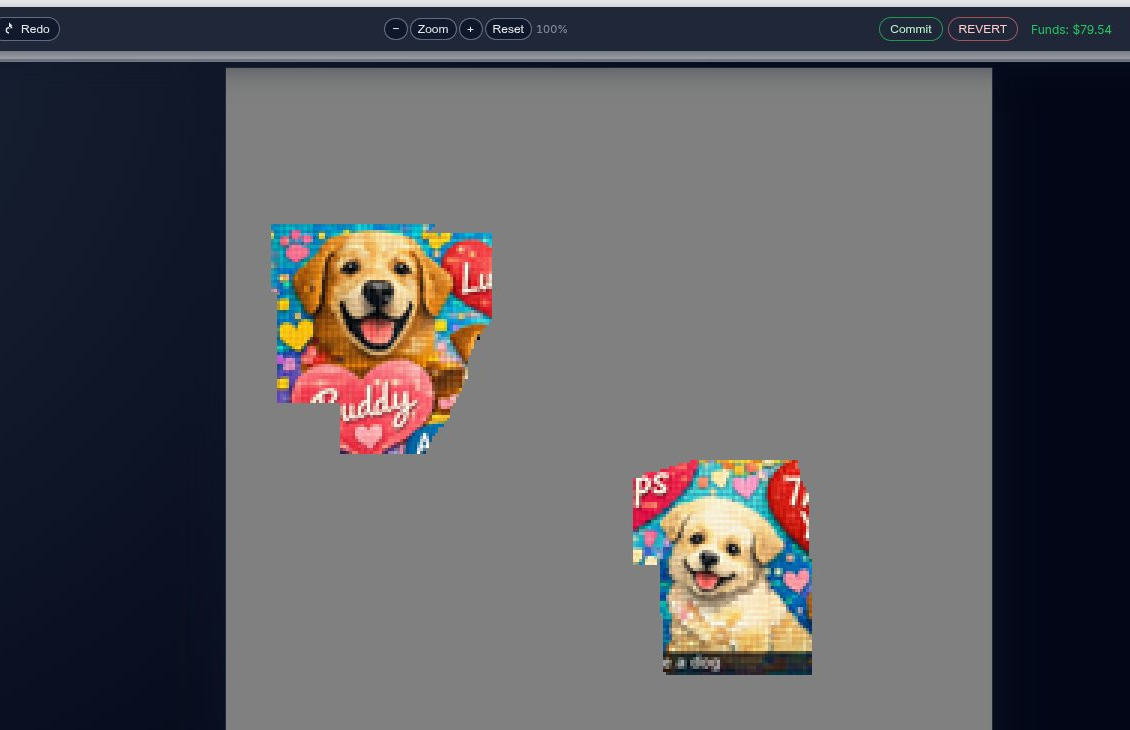
A scratch-off mosaic in progress: the National Mill Dog Rescue campaign mid-reveal, with two dog photos already uncovered against the gray covered canvas.
A Type 3 mosaic mid-scratch · the National Mill Dog Rescue campaign
Pricing

Set your pricing.

Two numbers shape your campaign's economics: the base price (how much one pixel costs at the start) and, for dynamic bidding, how that price escalates each time a pixel changes hands.

Base price

The cost to place one pixel. You pick this. The right number depends on your campaign — a small intimate memorial may price low to encourage broad participation; a high-attention event may set a higher price for signal value. Pick a number that reflects what one pixel of contribution should mean for your campaign.

Bid model (dynamic bidding only)

If you chose dynamic bidding, you also pick how the price escalates each time a pixel is overwritten. There are two models.

Additive

Predictable steps.

Each new bid adds a fixed amount to the previous price.

Example — $1.00 base, $0.50 increment:

$1.00 → $1.50 → $2.00 → $2.50 → $3.00

Predictable and accessible, with lower stakes per overwrite. Good for campaigns where you want broad participation rather than dramatic escalation.

Multiplicative

Dramatic escalation.

Each new bid multiplies the previous price by a fixed factor.

Example — $1.00 base, 1.5× multiplier:

$1.00 → $1.50 → $2.25 → $3.38 → $5.06

Hot spots become valuable quickly. Good for high-engagement campaigns where supporters compete for marquee positions and where each overwrite is a meaningful gesture.

How to choose

Additive favors inclusion and predictability. Multiplicative favors revenue and drama. If you are unsure, additive is the safer default for a first campaign.

Visuals

Place a background image.

You can upload a background image that sits underneath the mosaic — an anchor for the campaign that supporters interact with. Whether it is required, recommended, or optional depends on the mosaic type you chose.

Permanent & dynamic bidding · Optional

You can leave the canvas blank and let supporters create the artwork from scratch, or seed it with a background that shows through any unfilled regions. Either works. A background gives early supporters context to build around; a blank canvas puts the focus entirely on what the community contributes.

Uncover / scratch-off · Required

This type does not work without a background — the background is the campaign. Supporters scratch through the cover to expose pieces of it section by section, so you need to provide the image you want the campaign to ultimately reveal.

What works as a background

Your charity's logo, a photo connected to your cause (a rescue animal, a place, a person), a graphic carrying your campaign name, or a tribute layout with text. Higher-resolution images render more clearly when supporters zoom in.

Duration

Decide on a time limit.

A campaign can run open-ended or to a fixed end date. Both are supported, and the choice meaningfully shapes how supporters behave.

Open-ended

No closing date.

The mosaic stays live indefinitely. Pixels can be placed (or rebid, in dynamic bidding) at any time. Supporters can return whenever they want.

Best for — ongoing causes, perpetual donor walls, year-round memorials, open membership campaigns.

Fixed end date

A clear deadline.

You set a closing date. Supporters know they have until that date to participate. After it ends, the mosaic remains visible permanently but no further changes can be made.

Best for — events, anniversaries, milestone fundraisers, holiday campaigns. Tends to produce a contribution spike near the deadline.

Payments

Connect Stripe.

BidMosaic uses Stripe for all payment processing. Your organization connects its own Stripe account, and supporter contributions route directly into that account on Stripe's normal payout schedule.

  • Funds go to your organization, not to BidMosaic. We are a technology platform, not a fundraising intermediary.
  • Every transaction shows up in your Stripe dashboard with full reporting.
  • Stripe handles PCI-compliant card processing. No donor card details ever touch BidMosaic systems.
  • Refunds, chargebacks, and dispute resolution all happen through your Stripe account using Stripe's standard tools.
If you don't have Stripe yet

Signing up is free. You will need a bank account, your organization's EIN, and basic verification details. Most charities can finish setup in under an hour. Stripe operates in over forty countries.

Verification

Verify your nonprofit.

Before your campaign goes live, we ask for your organization's EIN and a copy of your IRS determination letter (or equivalent recognition from your country's tax authority). This lets us confirm you are a legitimate nonprofit before you accept donations on the platform.

  • BidMosaic does not issue tax receipts. Your organization issues those directly to donors using its own donation acknowledgment process.
  • Stripe transaction records are available in your Stripe dashboard and can serve as supporting documentation when you issue receipts.
  • If your organization is a 501(c)(3) in the United States, donor contributions through BidMosaic are eligible for the same tax treatment as any other direct donation to your organization.
Not legal advice

BidMosaic does not provide legal or tax advice. If you are unsure how to issue receipts or report income from a campaign, consult your organization's accountant.

Going live

Publish and launch.

Once your Stripe account is connected and your nonprofit verification is approved, you publish the campaign and supporters can begin contributing.

BidMosaic enforces platform-wide content rules across every campaign. Hateful, harassing, sexual, illegal, or otherwise inappropriate images, text, or comments are removed. Repeated abuse may result in account suspension. These rules apply automatically — you do not need to configure them.

Next step

Ready to set up a mosaic?

Tell us about your campaign and we will walk you through setup, verification, and launch.